

There’s a moment in every site owner’s life when you hit delete or move a page and think… uh oh. What now? You can’t just leave visitors wandering into an abandoned URL like it’s a ghost town. That’s where redirects step in. But choosing between a 301 vs 302 redirect SEO isn’t just a technical preference. It can quietly shape your traffic, your crawl budget, and even the direction your rankings take.
If you’ve ever felt a tiny jolt of anxiety while setting up a redirect, you’re not alone. Even seasoned marketers double check before hitting save. Because one wrong HTTP status code can nudge Google in a direction you didn’t intend.
Let’s break it down in a simple, practical way so you can use redirects confidently without playing guess-the-impact with your SEO.
301 Redirect: When You Mean It Forever
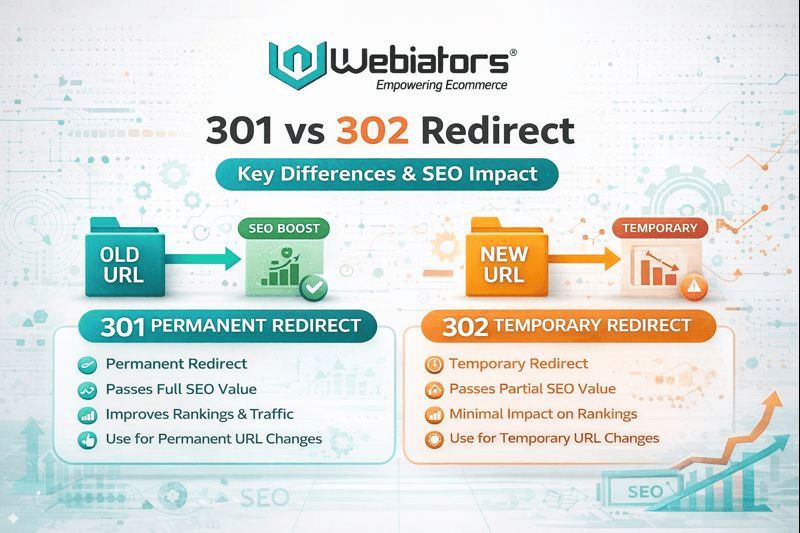
A 301 is a permanent redirect, and search engines take that word seriously. When you use it, you’re telling Google the old URL is retired and the new one is the official home.
301 Redirect SEO Benefits
A proper 301 passes most of the old page’s authority, which helps preserve rankings and keep your organic traffic from wobbling. If your ecommerce store reorganizes product categories or merges content into a richer resource page, a 301 is your best friend.
Think of it like forwarding your mail after moving to a new city. You don’t expect the post office to check in every month asking if you’re still there. It just updates the address system and moves on.
How a 301 Affects Your Crawl Budget
Search engines eventually drop the old URL from the crawl cycle and shift attention to the new one. Over time, it’s efficient and clean because Google doesn’t keep poking the old page trying to guess your intention.
For large ecommerce stores with hundreds or thousands of products, saving crawl budget can mean faster indexing of new releases and seasonal inventory shifts. If you’re working with a team offering Search Engine Optimization Services and facebook ads management services, they’ll almost always recommend a 301 for long-term content migration.
302 Redirect: When You’re Just Testing or Updating
A 302 is a temporary redirect. You use it when you might bring the original page back.
Maybe you’re running a quick A/B test. Maybe a product is out of stock and you don’t want to send customers to a dead end. Maybe you’re redesigning a landing page and want to shield it from the public eye for a short time.
The Real 302 Redirect Impact on SEO
Here’s where people get tripped up: Google usually keeps the original URL indexed because a 302 tells them the move isn’t final. That means the authority doesn’t always pass fully to the temporary page. If you accidentally use a 302 where a 301 was intended, you can end up holding your rankings hostage without realizing it.
Crawl Budget and 302s
Since Google believes the original page will come back, it continues crawling both URLs. Not a problem for small websites, but for growing stores that rely on Ecommerce development services, this can add unnecessary strain to your crawl budget.
Temporary redirects are meant to be short lived. The longer they stick around, the more confusing the signals become.
Also Read – 2026 Magento Security Checklist: How to Protect Your Ecommerce Store
Picking the Right Redirect for the Job
Let’s put the theory into real examples, because this is where the decision actually matters.
Use a 301 When:
- You’re retiring outdated content
- You’re migrating to a new domain
- You’re merging thin pages into one strong resource
- You’ve changed a URL for good (better slug, improved structure)
- A product is permanently discontinued
Every one of these scenarios sends a clear, long term message to Google. No hesitation. No mixed signals.
Use a 302 When:
- You’re testing a new layout
- A product is out of stock for only a short time
- You’re showing a different page during a promo
- You’re temporarily fixing technical issues
Short term situations deserve short term redirects. Once the change is over, remove the 302 and let the original URL resume its place.
How Redirects Impact Traffic in the Real World
Traffic shifts depending on how predictable your signals are.
A 301 generally stabilizes traffic because it consolidates value into a single target URL. If your content remains relevant, most users won’t even notice the change.
A 302, on the other hand, can keep your traffic divided. Search engines may continue ranking the old URL while users land on the temporary destination. If the detour lasts too long, both URLs can weaken.
Redirects aren’t about tricking search engines. They’re about clarity. The more consistent your signals are, the smoother your traffic behaves.
Redirect Errors & Fixes You Should Watch For
If you’ve ever chased down a redirect problem at 2 AM, you know they can cause chaos fast. A few common issues:
Redirect Chains
This is when page A leads to B, then B leads to C, and so on. Each hop wastes crawl budget and slows users down. Always redirect A to its final destination in one step.
Redirect Loops
A nightmare scenario where page A goes to B, and B goes right back to A. Users get stuck. Crawlers get stuck. Rankings suffer. Fix this immediately by checking your rules file for overlapping conditions.
Wrong Status Code
A permanent change marked as temporary sends mixed signals. A temporary change marked as permanent can remove a URL from Google too early. Double check every redirect rule, especially during site redesigns.
Trailing Slash Issues
ecommerce and /ecommerce/ are not the same to a server. A mismatch can create accidental redirect duplication. Pick one convention and stick to it.
Also Read – Best Content Management Systems in 2026: Top CMS Platforms Compared
Why Redirect Strategy Matters More for Ecommerce Sites
Ecommerce sites change constantly. Products come and go. Categories evolve. Seasonal pages rotate in and out. Without a redirect strategy, you end up with fragile URLs everywhere.
That’s why businesses partnering with Ecommerce development services often see stronger long term SEO stability. A well planned redirect structure protects revenue pages and prevents authority leaks.
Redirects are like plumbing. You don’t notice good plumbing, but you definitely notice bad plumbing.
Choose Precision, Not Guesswork
A redirect isn’t just a technical patch. It’s a signal that shapes how search engines trust and understand your website. Whether you use a 301 or a 302, do it with intention. Small choices can ripple into big SEO outcomes.
When you guide search engines with clarity, they reward your consistency. And your users feel it too, because every click lands exactly where it should.
If you want expert help refining your redirect setup, improving crawl efficiency, or building stronger ranking signals, our team at Webiators provides advanced Search Engine Optimization Services tailored for fast growing ecommerce brands.
Your website deserves a clean, confident structure. Every redirect is a chance to build it.
FAQs
Ans. 301 is permanent. 302 is temporary. If the old page won’t return, pick a 301. If it will, use a 302.
Ans. They pass most of it. Google has confirmed that 301 redirects transfer ranking signals effectively, so they’re safe for long term changes.
Ans. Yes. Multiple chains or unnecessary redirects waste crawl cycles. Clean up old rules regularly to keep your site efficient.
Ans. If the item will return, use a 302. If it’s discontinued forever, a 301 to the closest relevant category or alternative product is better.
Ans. Technically as long as you want, but the longer it stays, the more it confuses search engines. Convert it to a 301 if the change becomes permanent.
