


Migrating your ecommerce store to Shopify is a major business decision. Done well, it can simplify store management, improve customer experience, and create a stronger foundation for growth. Done poorly, it can lead to broken pages, lost traffic, and weeks of fixing avoidable issues.
Many businesses assume migration is simply about moving products to a new platform. In reality, it involves transferring SEO signals, customer records, order history, website content, integrations, and analytics without disrupting your business.
Search engines also need time to understand these changes. If URLs, redirects, metadata, or internal links aren’t handled correctly, your website may experience temporary ranking fluctuations while Google processes the new structure.
That’s why planning matters more than the migration itself.
Whether you’re moving from Magento, WooCommerce, BigCommerce, OpenCart, or another ecommerce platform, this guide will help you migrate confidently while protecting your organic visibility and customer experience.
Why Businesses Migrate to Shopify
Businesses usually migrate to Shopify because they need a platform that is easier to manage, scalable, and better suited for long-term ecommerce growth.
Lower Maintenance
Self-hosted platforms often require server management, software updates, plugin maintenance, and ongoing security patches. Shopify manages hosting, core platform updates, and infrastructure, allowing businesses to spend less time maintaining their website and more time growing it.
Easier Store Management
Shopify’s intuitive admin dashboard makes it easier to manage:
- Products
- Inventory
- Orders
- Discounts
- Collections
- Marketing campaigns
Many day-to-day tasks can be completed without extensive technical knowledge.
Better Scalability
As businesses grow, they need a platform that can support increasing traffic, larger product catalogs, and expanding sales channels. Shopify’s cloud-based infrastructure is designed to support businesses of different sizes, from startups to enterprise brands.
Large App Ecosystem
Most ecommerce businesses rely on tools for email marketing, loyalty programs, subscriptions, shipping, reviews, accounting, and automation.
Shopify offers a large ecosystem of apps that integrates with many popular business tools, making it easier to add new functionality as your store grows.
Strong Marketing Integrations
Shopify works with platforms such as:
- Google Analytics
- Google Merchant Center
- Meta Ads
- Klaviyo
- Google Ads
- Popular CRM and email marketing tools
These integrations help businesses measure performance and automate marketing activities.
Opportunity to Improve Performance
Many modern Shopify themes are built with performance in mind. Actual speed, however, also depends on image optimization, apps, third-party scripts, and technical implementation. A well-optimized Shopify store can deliver an excellent shopping experience across desktop and mobile devices.
Migration Risks You Should Know

Every ecommerce migration carries some risk, regardless of the platform.
Most issues aren’t caused by Shopify itself. They’re caused by poor planning or incomplete testing.
Understanding these risks helps you avoid them.
Temporary Ranking Fluctuations
One of the most common questions is:
Will I lose rankings after Shopify migration?
Some ranking movement is normal after any website migration because search engines need time to crawl new pages, process redirects, and update their index.
A well-planned migration reduces the chances of long-term SEO migration loss.
URL Changes
If important URLs change without proper redirects, search engines may treat them as new pages.
This can affect:
- Organic rankings
- Backlinks
- Customer bookmarks
- Referral traffic
Creating a URL mapping document before migration helps prevent these issues.
Missing Redirects
Redirects tell visitors and search engines where a page has moved.
Without proper 301 redirects:
- Visitors reach 404 pages.
- SEO authority may be lost.
- Backlinks stop passing value.
- Paid campaigns may send users to broken pages.
Data Migration Issues
Your ecommerce store contains more than products.
Migration should preserve:
- Product information
- Images
- Variants
- Customer accounts
- Order history
- Collections
- SEO metadata
Always validate migrated data before launch.
Broken Integrations
Many businesses depend on:
- Payment gateways
- Shipping providers
- CRM software
- Email marketing
- Inventory systems
- Review apps
Verify every integration after migration to avoid operational disruptions.
Analytics Problems
After migration, confirm that your tracking tools continue working correctly.
Check:
- Google Analytics 4
- Google Tag Manager
- Google Ads Conversion Tracking
- Meta Pixel
- Google Merchant Center
Without reliable tracking, measuring migration success becomes difficult.
Pre Migration Checklist
Good migrations begin weeks before launch.
Preparation reduces risk and makes the entire process much smoother.
1. Crawl Your Existing Website
Create a complete inventory of your website, including:
- Products
- Collections
- Blog posts
- Landing pages
- CMS pages
- Images
This information becomes the foundation for URL mapping and redirects.
2. Back Up Everything
Always create a complete backup before making changes.
Include:
- Products
- Customers
- Orders
- Images
- Theme files
- SEO metadata
- Database exports where available
3. Audit Current SEO Performance
Identify your most valuable pages by reviewing:
- Organic traffic
- Keyword rankings
- Backlinks
- Best-selling products
- High-converting landing pages
These pages deserve extra attention during migration.
4. Record Performance Benchmarks
Save your current metrics before migration.
| Metric | Why It Matters |
| Organic Traffic | Measures SEO impact |
| Keyword Rankings | Tracks visibility |
| Conversion Rate | Measures business performance |
| Revenue | Compares business results |
| Indexed Pages | Confirms search visibility |
These benchmarks make it easier to evaluate your migration after launch.
5. Review Third-Party Integrations
List every integration your business relies on, including:
- Payment gateways
- Shipping providers
- ERP software
- CRM systems
- Loyalty programs
- Email marketing
- Inventory management
Confirm each one has a compatible Shopify solution.
6. Clean Your Catalog
Migration is the perfect opportunity to improve your store.
Remove:
- Duplicate products
- Outdated content
- Broken images
- Empty collections
- Discontinued products
A cleaner catalog improves both customer experience and store management.
7. Perform a Technical SEO Audit
A Technical SEO Audit helps identify existing issues before migration.
Review:
- Crawl errors
- Broken links
- Duplicate content
- Redirect chains
- Missing metadata
- Structured data errors
Fixing these issues before migration prevents them from carrying into your new Shopify store.
8. Plan Your Launch
Avoid migrating during:
- Holiday sales
- Major promotions
- Seasonal peaks
- New product launches
Launching during a quieter period gives your team time to monitor the website and resolve issues quickly.
Migration Priority Checklist
| Migration Area | Priority |
| URL Mapping | High |
| 301 Redirects | High |
| Product Data | High |
| SEO Metadata | High |
| Customer Data | Medium |
| Order History | Medium |
| Analytics Tracking | High |
| Third-Party Integrations | High |
| Quality Assurance Testing | High |
Completing these tasks before migration significantly reduces Shopify migration errors and prepares your business for a smoother launch.
URL Structure Planning
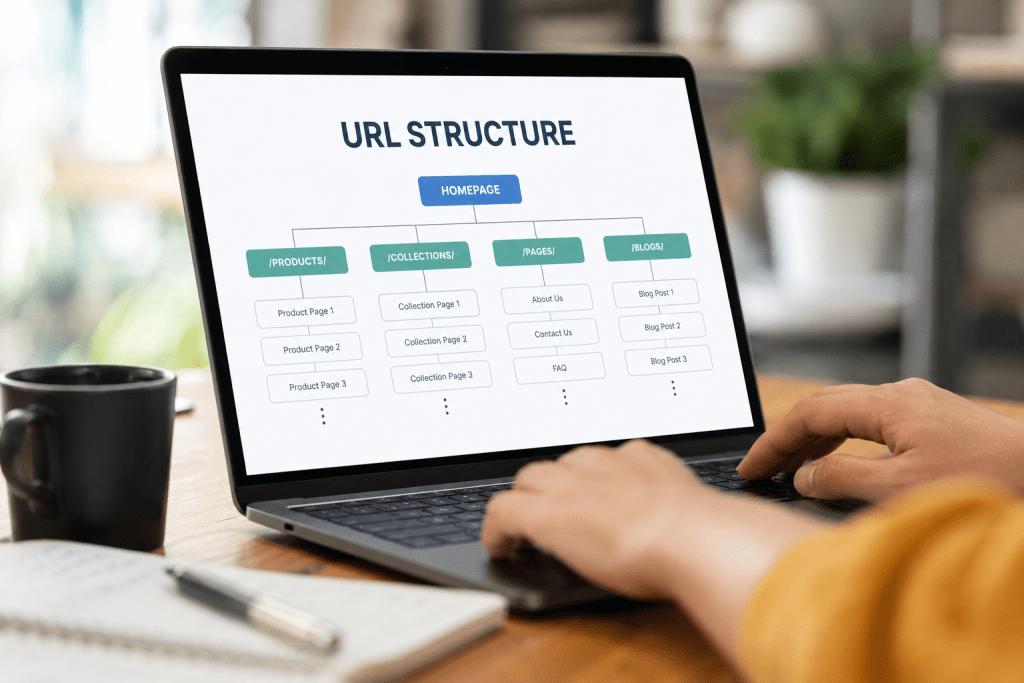
A well-planned URL structure helps preserve search visibility and provides a smoother experience for both users and search engines. Before migrating, review your existing URLs and avoid changing them unless necessary.
Preserve High-Value URLs
If a product, collection, or blog page already ranks well and receives steady traffic, keep its URL unchanged whenever possible. Unnecessary URL changes create extra redirects and increase migration complexity.
Create a URL Mapping Document
Before migration, map every existing URL to its new Shopify destination.
Include:
- Product pages
- Collection pages
- Blog posts
- Landing pages
- CMS pages
This document becomes your migration blueprint and reduces the chance of broken links.
Understand Shopify’s URL Structure
Shopify uses predefined URL paths, including:
- /products/
- /collections/
- /pages/
- /blogs/
Because of this, some URL changes may be unavoidable. When they occur, use proper 301 redirects instead of leaving old URLs inaccessible.
Review Internal Links
Update links across your website so they point directly to the new pages instead of relying on redirects.
Check:
- Navigation menus
- Product descriptions
- Collection pages
- Blog articles
- Footer links
Also verify that product images and image alt text have been migrated correctly.
Redirect Strategy
Redirects are one of the most important parts of any Shopify migration checklist. They tell visitors and search engines where content has moved and help preserve existing SEO value.
Implement 301 Redirects
Whenever a URL changes, create a permanent 301 redirect to the most relevant new page.
Avoid redirecting everything to the homepage. A product should redirect to its replacement product, and a category should redirect to the closest matching collection.
Remove Redirect Chains
Redirects should go directly to the final destination.
Instead of:
Old URL → Page A → Page B
Use:
Old URL → Final Page
This improves crawl efficiency and page loading.
Test Redirects Before Launch
Verify that:
- Every important URL redirects correctly.
- No redirect loops exist.
- No 404 errors remain.
- High-traffic pages work properly.
Keep redirects active for at least 12 months, especially for pages with valuable backlinks.
Product, Customer, and Order Migration

Migrating data is about accuracy, not speed. Before launch, validate every critical record to ensure customers experience a seamless transition.
Product Migration
Confirm that the following data has transferred correctly:
- Product titles
- Descriptions
- Prices
- SKUs
- Variants
- Inventory
- Images
- Image alt text
- Collections
- Product reviews (if applicable)
- SEO titles and meta descriptions
If product URLs change, include them in your redirect plan.
Customer Migration
Customer data usually includes:
- Names
- Email addresses
- Phone numbers
- Billing and shipping addresses
- Customer tags
- Marketing preferences
Passwords often cannot be migrated because different platforms use different encryption methods. In most cases, customers will need to reset their password or activate their account after launch.
Communicate this in advance to reduce support requests.
Order Data Migration
Depending on your business requirements, migrate enough order history to support customer service, reporting, and accounting.
Verify that:
- Order numbers are accurate.
- Customer purchase history is available.
- Taxes and discounts match.
- Refund records are complete.
- Subscription orders continue working if applicable.
Finally, place several test orders to confirm checkout, payments, inventory updates, confirmation emails, and refunds all work as expected.
SEO Preservation Checklist
Protecting SEO should remain a priority throughout the migration. Most ranking issues occur because important SEO elements are overlooked rather than because of Shopify itself.
Preserve Metadata
Review important pages to ensure they retain:
- SEO titles
- Meta descriptions
- Canonical tags
- Meta robots directives
- Open Graph tags
- Image alt text
- Submit Your Sitemap
Shopify automatically generates an XML sitemap. After launch, submit it through Google Search Console to help search engines discover updated pages more efficiently.
Review Robots and Indexing
Confirm that important pages are crawlable and that staging or development pages aren’t indexed accidentally.
Check:
- Robots.txt
- Canonical tags
- Noindex directives
Validate Structured Data
Test schema markup for:
- Products
- Organization
- Breadcrumbs
- Articles
- FAQs
Fix any validation errors before they affect search visibility.
Monitor Performance
During the first few weeks after migration, monitor:
- Google Search Console
- Organic traffic
- Keyword rankings
- Crawl errors
- Indexed pages
- Core Web Vitals
Some ranking fluctuation is normal, but ongoing monitoring helps you identify issues before they become serious.
If SEO is a major revenue driver, consider working with an experienced Ecommerce SEO Services provider to review your migration and identify technical issues early.
Common Migration Mistakes
Even with a well-planned migration checklist, businesses often run into avoidable issues that can impact traffic, rankings, and sales. One of the most common mistakes is not backing up the full website before migration, which can lead to irreversible data loss. Another frequent issue is improper URL redirection—when old URLs are not correctly mapped to new ones, it results in broken links and a drop in SEO performance.
Many store owners also forget to test the new site in a staging environment, leading to unexpected layout issues, missing images, or broken functionality after launch. Ignoring SEO elements such as meta titles, descriptions, and structured data during migration can also significantly affect search visibility. Lastly, launching without a proper performance test often leads to slow loading speeds, which directly impacts user experience and conversions.
Post-Migration Validation
Once your migration is complete, validation is crucial to ensure everything works as expected. Start by checking all key pages, including the homepage, product pages, category pages, and checkout process, to confirm they are loading correctly.
Next, verify that all 301 redirects are functioning properly and that no broken links remain. It is equally important to test mobile responsiveness across different devices and browsers to ensure a consistent user experience.
From an SEO perspective, use tools like Google Search Console to monitor crawl errors, indexing status, and traffic changes. Also, confirm that analytics tracking (Google Analytics or similar tools) is correctly installed and recording data accurately.
Finally, run a full site speed test to ensure the migrated website meets performance standards and delivers a smooth browsing experience.
Conclusion
Website migration is a major step that requires careful planning, execution, and post-launch monitoring. When done correctly, it not only preserves your existing traffic and rankings but also improves site performance, user experience, and scalability. However, even small mistakes can lead to significant SEO and revenue loss, making attention to detail extremely important.
Ready to migrate your website without risking your traffic or SEO rankings? Let experts handle the process for you. At Webiators, we specialize in seamless, secure, and performance-focused ecommerce migrations that help businesses grow without disruption. Get in touch for Shopify Migration Services today and move your store with confidence.
FAQs
1. How long does a website migration take?
The timeline depends on the size and complexity of the website. A small store may take a few days, while larger ecommerce sites can take several weeks.
2. Will migration affect my SEO rankings?
If done correctly with proper redirects and SEO setup, rankings may experience minor fluctuations but will stabilize over time.
3. What is the most important step in website migration?
Setting up accurate 301 redirects is critical to preserving SEO value and avoiding broken links.
4. Can I migrate my website without losing data?
Yes, with a full backup and careful planning, data loss can be completely avoided.
5. Do I need technical expertise for migration?
While basic migrations can be handled with tools, professional assistance is recommended for complex ecommerce sites to avoid costly errors.
