

You wouldn’t trust your accountant to file taxes blindfolded. So why let your ecommerce platform migration run on assumptions and hope? The number of businesses that lose traffic, revenue, and even customer trust after a Shopify migration is shocking, and it’s rarely because Shopify itself is flawed.
In fact, when done right, platform migrations boost revenue, improve performance, and future-proof your business. A Commercetools report found that ‘90 % of ecommerce platform migrations drove revenue growth, with many seeing 10 % to 30 % increases after a well-executed move.’
But the catch? That promise hinges on an expert execution — not wishful thinking.
Let’s unpack why most Shopify migrations stumble, crash, or stall… and how your business can avoid the pain.
The Harsh Reality Behind Poor Shopify Migrations

Fundamentally, companies fail when they treat a Shopify migration like a theme swap or a quick data export job. It isn’t. It’s a complete replatforming — a strategic reset that touches every revenue-critical system you rely on.
Here’s what typically goes wrong:
1. Data Chaos Costs More Than You Think
You can survive a few broken buttons. You can’t survive lost order history, disappeared customer accounts, or skewed analytics.
Migration isn’t just moving rows and columns. It’s aligning SKUs, customer metadata, order histories, and loyalty-point systems into Shopify’s structured world. Miss this and your store may launch with:
- Missing variant rules
- Broken pricing logic
- Inaccurate inventory counts
These aren’t cosmetic issues. They affect buyer trust, fulfillment accuracy, and marketing insights — ultimately hurting revenue.
Bottom line: before migration, clean and audit your data. Validate every product, order, account, and historical record.
2. SEO Disaster = Silent Revenue Leak
Traffic is fragile. You’ve spent years building organic visibility — every ranking is a small but meaningful revenue engine.
Platform migrations normally change URL structures. If you don’t plan redirects perfectly, Google sees brand-new pages, rankings tank, and traffic evaporates. Many businesses face 25 %–50 % organic traffic loss after a sloppy migration — with recovery taking months.
A botched SEO plan isn’t just inconvenient. It’s a day-one revenue hit that can last.
Pro tip: map every legacy URL to its Shopify destination BEFORE launch and test redirects thoroughly.
3. Integrations Break When You Least Expect It
Most stores don’t just sell online — they run through a web of systems:
- ERP and accounting sync
- Shipping and fulfillment engines
- Inventory management
- Loyalty programs
- Analytics and ad tracking
If any of these break, your store won’t just glitch — it may stop generating revenue. Integrations often don’t behave identically post-migration.
This is why simple data imports are never enough.
4. You Neglected the Human Side of Migration
Technical wins mean nothing if your team and customers are left confused.
Post-launch chaos often stems from:
- Lack of internal training
- Broken checkout or POS workflows
- Customer accounts that don’t map correctly
Remember, your employees and customers are part of the migration equation. Plan communication and training alongside your technical strategy.
Your Migration Should Be a Strategic Advantage
Good migrations aren’t about avoiding mistakes — they’re about engineering a future-ready commerce engine.
Here’s what works:
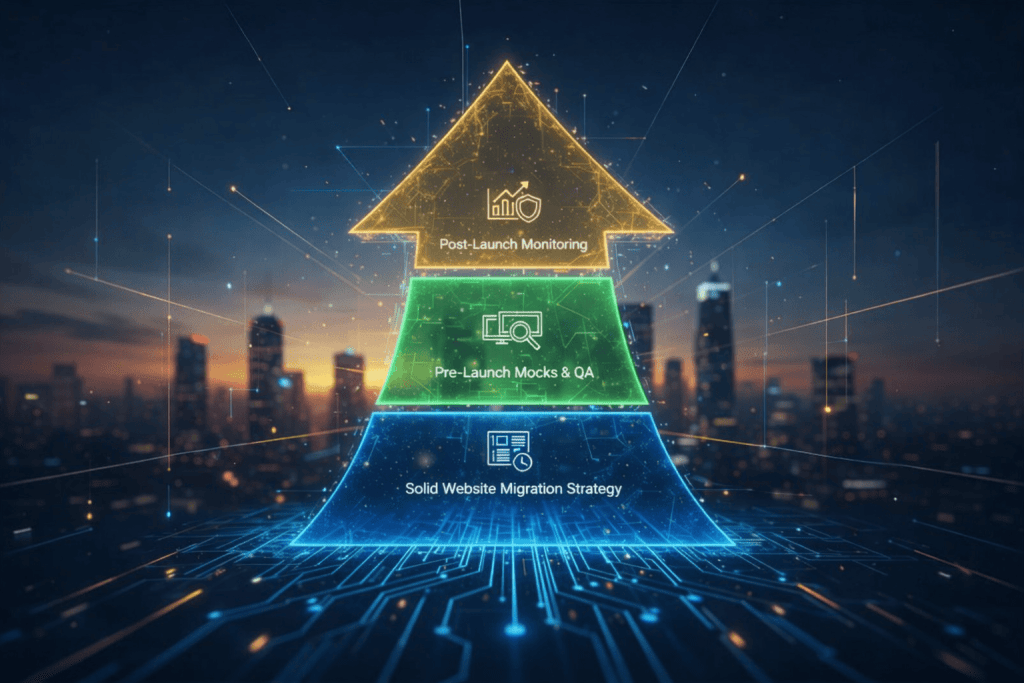
A. Solid Website Migration Strategy
Start with goals, not timelines. What metrics do you need to protect? What’s non-negotiable (data, SEO, customer accounts)? Answer these first.
B. Pre-Launch Mocks & QA
Only treat your staging environment like real traffic if your testing mirrors real world complexity — different devices, logged-in customers, and peak traffic scenarios.
C. Post-Launch Monitoring
Have a plan for the first 48 hrs that includes SEO performance, order accuracy, payments, page speed, analytics firewalls, and customer support readiness.
Tie-Ins That Will Help You Stabilize Fast
If you’re serious about safeguarding revenue while scaling:
- Invest early in Shopify migration services that specialize in risk mitigation
- Follow up with Shopify Performance Optimization to keep load times fast
- Embed long-term growth via Shopify Development Services and Ecommerce development services
These concentric layers of expertise don’t just migrate your store — they propel it.
Migrate Smart, Not Fast
A Shopify migration isn’t a cost. When done right, it’s a strategic investment in resilience, scalability, and revenue growth. But rushing, cutting corners, or relying on guesswork invites the very problems you’re trying to solve.
You deserve a migration that protects your data, preserves your SEO, and boosts your bottom line. Engineering that requires expert strategy — and expert partners.
So ask yourself one question:
Do you want a migration that merely moves your store — or one that transforms your business?
If you want both innovation and revenue safety, the right Shopify migration partner, Webiators, is here to make all the difference.
FAQs
1. Why do Shopify migrations fail so often?
Ans. Most failures stem from poor data handling, skipped SEO redirect plans, and broken integrations.
2. Will my rankings drop after migration?
Ans. If redirects are missing or incorrect, yes — traffic and rankings can drop significantly.
3. Can I migrate without losing customer data?
Ans. Yes — but only with a precise audit, cleaning process, and expert import strategy.
4. How long should a proper Shopify migration take?
Ans. It depends on store complexity, but rushing often causes failure. Plan for planning, testing, and validation.
5. Does Shopify handle SEO automatically?
Ans. Shopify provides a strong technical foundation, but SEO preservation requires manual redirect mapping and validation.
