

Your website ranked well last month. Now, fewer people are finding your products, organic clicks are falling, and sales enquiries have slowed down. A Google Core Update could be responsible, but changing every page in response is a risky move. First, find out which pages lost traffic, what changed, and whether the decline is actually related to Google.
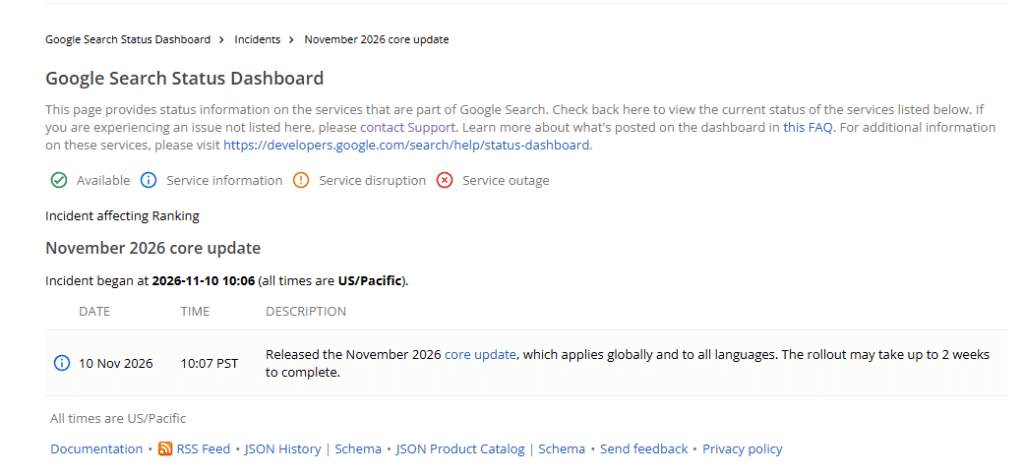
As of November 20, 2026, Google’s Search Status Dashboard lists the November 2026 Core Update as active. It started on November 10, with a rollout period of up to two weeks. Check Google’s official update status before drawing conclusions.
Why Do Google Algorithm Updates Affect Website Traffic?
Google makes broad changes to its search systems several times a year. A Google Core Update reassesses how its systems identify useful and relevant pages. It does not automatically mean a website has been penalized.
For example, an ecommerce store might notice that its category pages have lost visibility while its blog traffic remains steady. Another store might see product pages slipping below competitors offering clearer product information.
Other reasons for a traffic decline include:
- Seasonal changes in customer demand.
- Competitors publishing better or more useful pages.
- Broken website links or accidental indexing changes.
- Website redesigns or platform migrations.
- Changes in search results that affect clicks.
The timing of a traffic drop is a clue, not proof of its cause.
What Should Businesses Do When Google Rankings Suddenly Drop?
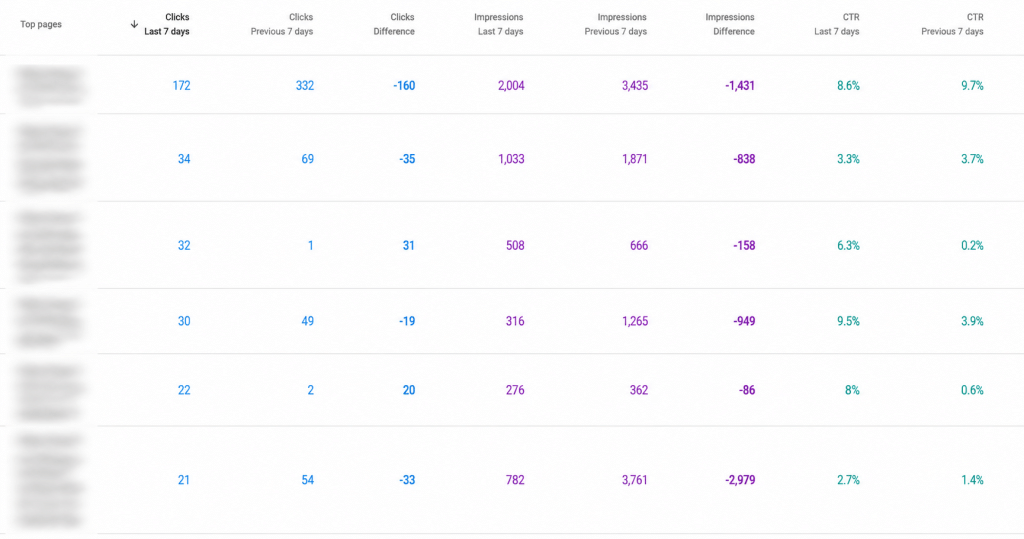
When your Google ranking suddenly drops, start with these checks instead of making immediate changes.
1. Check whether the update has finished.
Visit Google’s Search Status Dashboard and confirm the rollout dates. Google recommends waiting at least one full week after a Core Update finishes before comparing Search Console performance.
2. Find the pages losing visitors.
Open Google Search Console and compare clicks, impressions, average position and click-through rate. Check individual pages and search queries.
Are product pages losing visibility? Has one category disappeared from search results? Specific patterns make the problem easier to investigate.
3. Check whether fewer visitors are affecting sales.
Use Google Analytics to compare organic visits, product views, enquiries, add-to-carts and completed purchases. A small decline in traffic may be less concerning than losing visitors who were ready to buy.
4. Look for website problems.
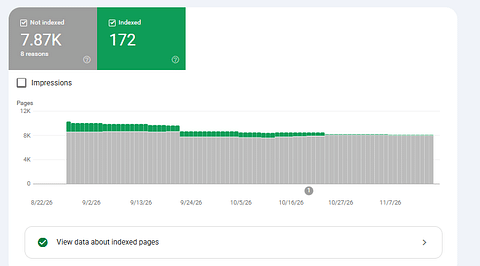
Check whether important pages are still accessible and indexed. Review broken links, redirects, page loading errors and recent website changes. Also check Google’s Manual Actions and Security Issues reports.
A professional Ecommerce SEO Audit can help identify whether the problem is related to content, website structure or technical issues.
Google also provides a useful guide to investigating Search traffic drops.
How Can You Recover Website Rankings After a Google Core Update?
Once you know which pages have lost visibility, review them from a shopper’s perspective.
A product page should answer the questions a customer might ask before spending money. Is the product suitable for their needs? What sizes or variations are available? How much does delivery cost? What happens if they need to return it?
Check these areas:
- Product pages: Add useful descriptions, accurate specifications, clear images and current availability.
- Category pages: Help shoppers compare products instead of filling the page with repetitive descriptions.
- Website navigation: Make important categories and products easy to reach.
- Page information: Remove outdated details and replace vague statements with helpful information.
Google recommends linking category pages to subcategories and individual products so search engines can discover important pages more easily. Read Google’s ecommerce website structure guidelines.
Sometimes, content improvements alone are not enough. A poorly organized store, difficult navigation or problems introduced during a redesign may need development work. This is where Ecommerce Development Services can help address problems with the website itself.
How Can You Protect Your Website from Future Google Algorithm Updates?
No business can prevent Google from changing its search systems. However, you can avoid relying on quick SEO fixes every time rankings move.
Make these practices part of your regular website maintenance:
- Review important product and category pages regularly.
- Keep product prices, descriptions and availability accurate.
- Check website performance and indexing after major changes.
- Track organic traffic and sales, not just keyword positions.
- Give customers useful information throughout their buying journey.
Your business should also avoid depending entirely on Google for visitors. Ecommerce Marketing Services can help connect organic search with paid campaigns, social media and other ways of reaching potential customers.
For businesses dealing with wider website or growth challenges, Ecommerce Consulting Services can help identify priorities before investing in further changes.
Frequently Asked Questions
1. Why has my website traffic dropped after a Google Core Update?
Your pages may have lost rankings because Google’s systems reassessed their relevance compared with other search results. Technical problems, seasonal demand and stronger competitors can also cause traffic declines.
2. How long does it take to recover website rankings?
There is no fixed recovery period. Some improvements may appear within days, while broader content improvements can take several months to show results. Google does not guarantee that changes will restore previous rankings.
3. Should I change all my website content after a Google update?
No. Identify the pages with significant declines first. Improve information that is outdated, incomplete or less useful than competing results. Avoid making unnecessary changes to pages that continue to perform well.
4. Can technical website issues affect Google rankings?
Yes. Problems such as broken pages, incorrect indexing settings, blocked URLs and poor website navigation can prevent search engines from finding or understanding important pages.
5. When should I consider a professional SEO audit?
Consider one when traffic declines are sustained, important pages lose visibility, or you cannot identify the cause. An audit can help turn scattered performance issues into a clear list of actions.
Don’t Guess Why Your Website Traffic Fell
A Google update may have changed your rankings, but the real problem could be somewhere else. Check the affected pages, study the traffic data and fix the issues that matter to your customers.
Your next SEO decision should come from evidence, not panic.