


You check your analytics and smile for a second. Mobile traffic keeps climbing month after month. Then reality hits. Sales haven’t kept up.
If that sounds familiar, you’re not alone.
Many ecommerce businesses spend thousands of dollars attracting mobile visitors through SEO, paid ads, email campaigns, and social media. Yet their mobile conversion rate barely moves. The problem usually isn’t the traffic source. It’s what happens after someone lands on the website.
Research from Statista consistently shows that mobile devices generate well over half of global ecommerce traffic, while desktop visitors continue to convert at higher rates. Google has also made mobile-first indexing the standard, meaning your mobile experience influences both search visibility and customer satisfaction. In other words, poor mobile performance can quietly affect rankings, engagement, and revenue at the same time.
I’ve worked with ecommerce businesses that believed they needed bigger advertising budgets. After reviewing their stores, the real issue was surprisingly simple. Tiny usability problems were pushing potential customers away long before they reached the checkout.
That is exactly where mobile CRO becomes essential.
Instead of chasing more visitors, mobile conversion rate optimization helps you convert more of the visitors you already have.
Let’s uncover the biggest mistakes that still hurt mobile conversions in 2026 and learn how to fix them.
Mobile Commerce Trends Show One Clear Opportunity
Mobile commerce isn’t just growing. It’s shaping how people discover, compare, and purchase products every day.
According to Statista, mobile commerce now accounts for the majority of ecommerce traffic worldwide. Whether someone is browsing during lunch, checking prices while standing inside a retail store, or shopping from the couch, the smartphone has become the preferred shopping device.
Yet there is an interesting contradiction.
Desktop visitors generally complete purchases more often than mobile users.
That gap represents a significant revenue opportunity.
Many businesses assume lower mobile conversions are normal. They aren’t. In most cases, visitors abandon the journey because something creates friction.
Common reasons include:
- Slow loading pages
- Difficult navigation
- Poor product presentation
- Confusing checkout process
- Weak trust signals
Each issue may seem minor on its own. Combined, they create enough frustration for users to leave and buy from a competitor instead.
Mobile Users Behave Differently Than Desktop Shoppers
One of the biggest mistakes I see is treating mobile visitors exactly like desktop users.
Their behavior is completely different.
Desktop users often research products in a focused environment. Mobile users rarely have that luxury.
They shop while commuting.
Waiting for coffee.
Watching television.
Standing in a checkout line.
Responding to messages.
Their attention shifts constantly.
That means every unnecessary tap, delay, or confusing interaction increases the chance they’ll leave.
Google’s consumer behavior studies repeatedly show that mobile users expect instant access to information. If they can’t quickly understand what you’re selling or how to buy it, they’ll simply return to search results.
Successful cro for mobile starts with respecting those habits instead of fighting them.
Ask yourself:
Can someone find your product in five seconds?
Can they add it to the cart without searching for the button?
Can they understand shipping costs immediately?
Small questions often reveal large conversion problems.
Mobile UX Issues That Quietly Reduce Sales
A beautiful website doesn’t always create a great shopping experience.
I’ve reviewed stores that looked stunning on desktop but became frustrating on a smartphone.
The biggest mobile UX optimization mistakes include:
Tiny Tap Targets
Buttons that are too small cause accidental clicks.
Users become frustrated quickly.
Google recommends designing touch targets that are comfortable for fingers, not mouse pointers.
Many ecommerce stores copy desktop navigation onto mobile devices.
The result?
Menus become cluttered.
Important categories disappear.
Search becomes difficult to use.
Effective navigation should help users reach products with as few taps as possible.
Weak Product Discovery
Visitors should never struggle to find products.
Strong mobile stores include:
- Smart search suggestions
- Helpful filters
- Clear categories
- Predictive search
- Recently viewed products
Finding products should feel effortless.
Hidden Call-to-Action Buttons
One surprisingly common issue is placing the “Add to Cart” button far below the product description.
On desktop, this may not matter.
On mobile, it often kills momentum.
Many successful ecommerce brands now use sticky Add to Cart buttons that remain visible while users scroll.
Simple.
Convenient.
Effective.
Poor Readability
Crowded layouts create mental fatigue.
Instead, use:
- Larger fonts
- Better spacing
- Clear headings
- Short paragraphs
- High contrast buttons
Good design isn’t decoration.
It’s communication.
Mobile Speed Problems Cost More Than You Think

Speed affects every stage of the buying journey.
Google’s Core Web Vitals continue to emphasize loading performance because users consistently abandon slow websites. Research across the ecommerce industry has also found that faster pages are associated with better engagement and stronger conversion performance, although the exact improvement varies by business.
Every second matters.
A slow homepage creates a poor first impression.
A slow category page interrupts browsing.
A slow product page raises doubts.
A slow checkout encourages abandonment.
Some of the biggest speed killers include:
Oversized product images
- Heavy JavaScript
- Too many third party apps
- Auto playing videos
- Poor hosting infrastructure
- Unoptimized Shopify themes
Modern image formats such as WebP, lazy loading, code optimization, browser caching, and content delivery networks can significantly improve loading performance without sacrificing design quality.
If your store runs on Shopify, regularly reviewing installed apps is equally important. Many stores accumulate apps over time, each adding scripts that slow down the shopping experience. This is where professional Shopify Development Services can help identify unnecessary code, streamline theme performance, and improve the overall mobile experience.
Product Page Optimization: Where Mobile Buying Decisions Are Made
Many ecommerce businesses focus on attracting more visitors but overlook the page that actually drives revenue. Your product page is where curiosity turns into confidence. On mobile, every element must help shoppers make a quick, informed decision.
A common mistake is designing product pages that look impressive but hide the information customers need most. Mobile shoppers rarely scroll endlessly searching for shipping details or return policies. If answers aren’t easy to find, they often leave.
A high-converting product page should include:
- High-resolution images with pinch-to-zoom functionality
- Product videos showing real-world use
- Clear pricing without hidden costs
- Visible customer reviews and ratings
- Stock availability
- Estimated delivery dates
- Return and exchange information
- Trust badges and secure payment icons
- A sticky Add to Cart button
Reviews deserve special attention.
According to Baymard Institute, users actively rely on reviews when evaluating products online. Displaying ratings near the product title and highlighting genuine customer feedback can reduce uncertainty and encourage purchases.
Your product descriptions also matter more than many businesses realize.
Instead of simply listing specifications, explain how the product solves a problem. Help shoppers picture themselves using it. That’s the difference between describing a product and selling it.
If your product pages attract traffic but fail to generate sales, investing in professional CRO Optimization Services can uncover hidden usability issues through heatmaps, session recordings, and conversion funnel analysis.
Mobile Checkout: The Biggest Revenue Leak
Ask any ecommerce consultant where businesses lose the most sales, and checkout is almost always part of the answer.
Research from Baymard Institute consistently shows that complicated checkout experiences remain one of the leading causes of cart abandonment.
Here are some of the biggest offenders:
Forced Account Creation
Not everyone wants to create an account before making a purchase.
Offer guest checkout as the default option. You can always invite customers to create an account after the order is complete.
Too Many Form Fields
Typing on a phone isn’t enjoyable.
Every unnecessary field increases friction.
Only ask for information that’s essential to complete the order.
Limited Payment Options
Today’s shoppers expect flexibility.
Popular payment methods include:
- Apple Pay
- Google Pay
- Shop Pay
- PayPal
- Major credit and debit cards
The fewer steps between selecting a product and completing payment, the better.
Unexpected Costs
Hidden shipping fees remain one of the biggest reasons shoppers abandon their carts.
Display shipping costs, taxes, and delivery estimates as early as possible. Transparency builds trust.
Poor Error Handling
Nothing frustrates shoppers more than submitting a form only to discover an error without knowing how to fix it.
Use real-time validation and clear error messages to keep customers moving toward checkout completion.
Practical Mobile CRO Improvements That Deliver Results
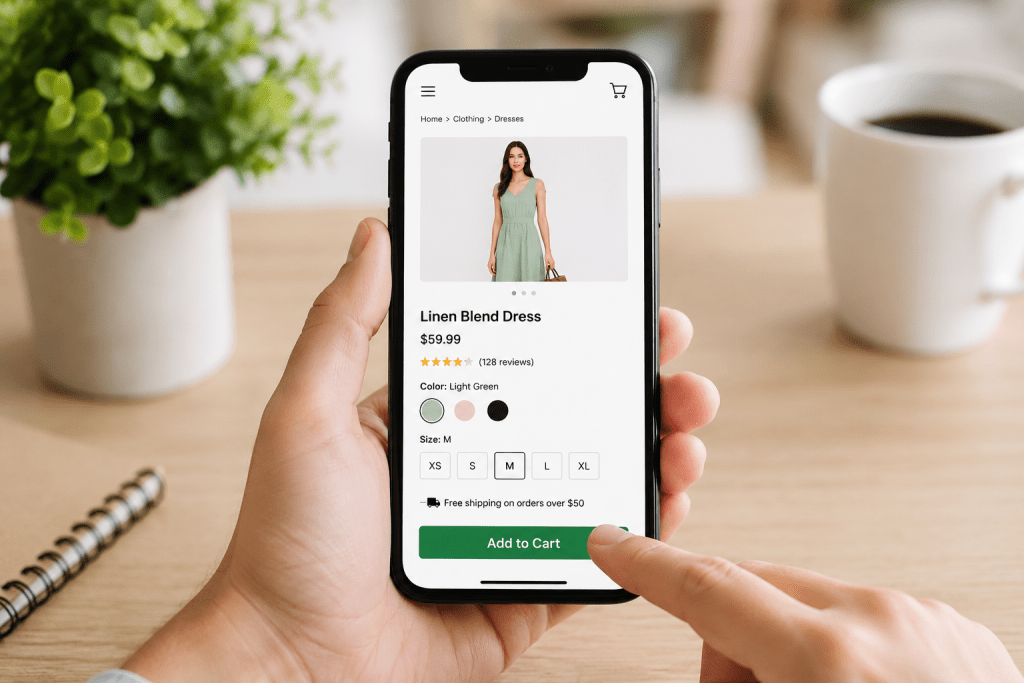
Improving mobile CRO isn’t about making dozens of changes at once. Small, measurable improvements often create the biggest gains over time.
Focus on testing changes that directly affect user behavior.
Some high-impact opportunities include:
- Making the Add to Cart button sticky
- Moving customer reviews higher on the page
- Simplifying the navigation menu
- Improving product search with autocomplete
- Increasing button size for easier tapping
- Reducing popup interruptions
- Highlighting free shipping offers
- Displaying trust badges near payment options
- Improving page loading speed
- Making product images larger and easier to view
Remember, assumptions don’t increase conversions.
Testing does.
Build a Mobile CRO Testing Framework
The most successful ecommerce brands don’t redesign their websites every few years. They continuously optimize them.
A simple testing framework looks like this:
1. Measure User Behavior
Start with data instead of opinions.
Use tools like:
- Google Analytics 4
- Microsoft Clarity
- Hotjar
- Google Search Console
Monitor metrics such as:
- Bounce rate
- Scroll depth
- Exit pages
- Cart abandonment
- Conversion rate
2. Identify Friction
Look for patterns.
Where are users dropping off?
Which pages have unusually high exits?
Where do visitors repeatedly tap without taking action?
Session recordings and heatmaps often reveal problems that traditional analytics miss.
3. Create a Hypothesis
For example:
“Moving the Add to Cart button above the product description will increase mobile conversions because shoppers can act immediately.”
Keep each hypothesis focused on one specific change.
4. Run an A/B Test
Test one variable at a time.
Changing multiple elements simultaneously makes it difficult to understand what actually influenced the results.
Allow enough traffic to reach statistical significance before drawing conclusions.
5. Scale What Works
When a test delivers measurable improvement, implement it across similar pages.
Optimization is an ongoing process, not a one-time project.
Why SEO and Mobile CRO Work Better Together
Driving more traffic without improving conversions is like pouring water into a leaking bucket.
Search engine optimization brings qualified visitors to your store, while conversion optimization ensures more of those visitors become customers.
This is why successful ecommerce brands combine mobile CRO with strong Ecommerce SEO Services. Better rankings increase visibility, while a friction-free mobile experience helps maximize the value of every click.
Conclusion
Mobile traffic has never been more valuable, but traffic alone doesn’t pay the bills.
Today’s shoppers expect speed, simplicity, and confidence from the moment they land on your website. Every unnecessary tap, slow-loading page, or confusing checkout step creates another opportunity for them to leave.
The encouraging part is that most conversion problems are fixable.
Improving your mobile experience doesn’t always require a complete redesign. Sometimes a faster page, a clearer product layout, or a simpler checkout can make a measurable difference.
If your analytics show strong mobile traffic but disappointing sales, don’t assume you need more visitors. First, find out why your existing visitors aren’t converting.
Request Your Mobile CRO Audit
Your mobile store may be losing revenue in ways that aren’t immediately visible. At Webiators, we help ecommerce businesses identify conversion barriers, improve the mobile shopping experience, and turn more visitors into paying customers.
Request a Mobile CRO Audit today and discover practical opportunities to increase conversions without increasing your advertising budget.
Frequently Asked Questions
1. What is mobile conversion rate?
A mobile conversion rate is the percentage of smartphone visitors who complete a desired action, such as making a purchase, submitting a form, or signing up for a newsletter.
2. Does speed matter on mobile?
Yes. Faster-loading websites provide a better user experience, reduce abandonment, and are associated with stronger engagement and higher conversion potential. Speed is also an important consideration for Google’s Core Web Vitals.
3. Are mobile users different from desktop users?
Absolutely. Mobile users are often multitasking, have shorter attention spans, and expect fast, intuitive experiences. Designing specifically for their behavior is essential for improving conversions.
4. What is mobile-first design?
Mobile-first design is an approach where websites are designed for smaller screens first and then adapted for larger devices. It prioritizes usability, performance, and accessibility on smartphones.
5. Is mobile optimization important for ecommerce?
Yes. Since the majority of ecommerce traffic now comes from mobile devices, optimizing your site’s speed, usability, product pages, and checkout experience is critical for improving both search visibility and sales.
